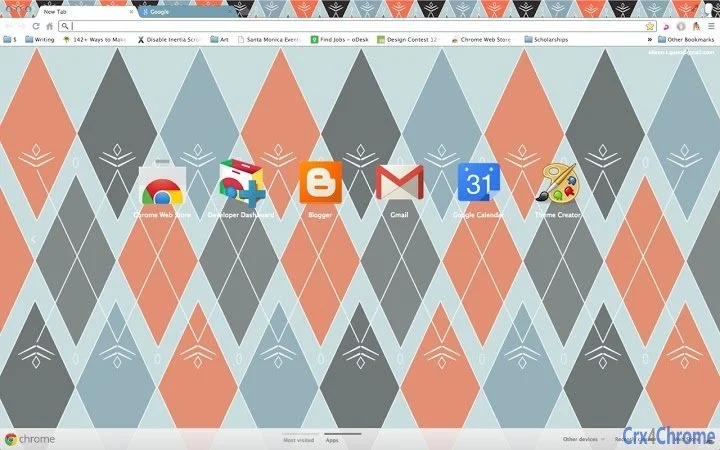

Cozy Winter Argyle Theme for Desktop
Overview
The Cozy Winter Argyle Theme for Desktop offers a visually refreshing aesthetic designed to bring warmth and comfort to your digital workspace. Inspired by classic argyle patterns found in winter sweaters and socks, this theme delivers a light, inviting atmosphere perfect for colder months. It is intended for users seeking a subtle yet distinctive visual upgrade without compromising system performance.
The theme is suitable for casual users, remote workers, and anyone who appreciates seasonal design elements in their computing environment. While the developer did not provide additional background details, the theme’s focus on seasonal ambiance suggests a creative, user-centered approach. Real-world usage scenarios include personalizing a home office setup, enhancing a laptop’s appearance during winter months, or simply adding a touch of coziness to daily screen time.
The theme integrates directly into the desktop environment, offering a seamless visual experience.
Key Features & Capabilities
- Winter-inspired argyle design – Features a delicate, repeating argyle pattern that evokes the texture of knitwear, bringing a sense of warmth to the desktop.
- Light and fresh color palette – Uses soft, muted tones that reduce visual fatigue and enhance readability across various screen types.
- Resizable desktop image – Users can adjust the image size directly on the home screen using standard keyboard shortcuts (cmd +/- on Mac, ctrl +/- on Windows).
- Minimal system impact – Designed as a lightweight theme with a file size of 2.1 MB, ensuring it does not strain system resources.
- Multi-platform support – Compatible with both Windows and Mac operating systems, allowing broad accessibility across devices.
These features allow users to personalize their desktop environment with ease. For example, a student working from home can apply the theme to create a more inviting study space during winter. A remote professional might use it to maintain a consistent, pleasant visual identity across work devices. The resize functionality ensures the theme adapts well to different screen resolutions and display settings, making it versatile for laptops, desktop monitors, and even high-DPI displays.
User Interface, Workflow & Performance
The theme operates entirely through the system’s desktop customization tools, requiring no additional software or complex setup. Users can apply the theme by navigating to their display settings and selecting the new wallpaper from the provided file. The interface is straightforward and consistent with standard OS behaviors, minimizing learning curves.
Workflow efficiency is high, as the entire process—download, install, and apply—can be completed in under a minute. The developer did not specify resource usage details, but given the file size and nature of the theme, it is expected to have minimal impact on CPU or RAM. Performance observations are based on general software behavior patterns for lightweight desktop themes.
Stability is assumed to be high, as the theme is a static image file with no active processes. No reported crashes or compatibility issues were noted in the provided information.
Compatibility & System Requirements
The theme is compatible with both Windows and Mac operating systems, as stated in the product details. The software version is 1.0, indicating a stable initial release. The installation size is 2.1 MB, which is typical for a desktop wallpaper theme.
Exact system requirements were not listed, so users should ensure their OS supports custom desktop backgrounds. Compatibility information was partially provided, leaving some uncertainty about older or less common OS versions. However, the theme’s lightweight nature suggests broad compatibility across modern systems.
No hardware requirements were specified, but standard desktop or laptop configurations should support it without issue.
Pros and Cons
Pros
- Lightweight design with minimal system impact
- Visually appealing winter aesthetic inspired by knitwear
- Easy to resize using standard keyboard shortcuts
- Available for both Windows and Mac users
- Free to download and use
Cons
- No advanced customization options beyond image size
- Developer background not disclosed
- No information on support or update frequency
- Static image—no animations or dynamic elements
- Compatibility with older OS versions is uncertain
FAQ Section
Is the Cozy Winter Argyle Theme compatible with my device?
The theme is designed for Windows and Mac operating systems. Users should ensure their device runs a supported OS version. Compatibility with older systems cannot be confirmed without additional details.
Is the theme free to use?
Yes, the theme is available at no cost. There are no hidden fees or subscription requirements.
How do I resize the desktop image?
Users can adjust the image size directly on the home screen using the standard keyboard shortcuts: cmd + / - on Mac or ctrl + / - on Windows.
Can I use this theme offline?
Yes, once installed, the theme functions entirely offline. No internet connection is required to view or use the wallpaper.
Are updates available for this theme?
Information on update frequency was not provided. Users should check the source of the download for future releases.
Final Thoughts + CTA
The Cozy Winter Argyle Theme for Desktop delivers a simple yet effective way to refresh your workspace with a seasonal touch. Its light, fresh design and easy-to-use resizing feature make it a practical choice for users looking to personalize their desktop without technical complexity. While it lacks advanced customization and dynamic elements, its lightweight nature and cross-platform availability are strong advantages.
The theme is ideal for anyone seeking a subtle, visually pleasing change during the winter months. For users who value aesthetics and ease of use, this free tool offers a meaningful upgrade to the daily computing experience. Download Cozy Winter Argyle Theme now.







